Have you ever wanted to use a custom mesh in Substance Designer but needed help importing it? In this tutorial, we’ll show you how to import a custom mesh into Substance Designer so you can be able to preview your materials in the actual mesh, not just a sphere or a cube.
We’ll also cover some tips and tricks for working with the 3D panel in Substance Designer. Ready to get started? Let’s go!
Get your model ready.
Substance Designer is a popular program for creating 3D textures and materials. One of the great things about Substance Designer is that it can take 3D models from other programs and import them so you can preview your materials.
This means that you can use any 3D model in Substance Designer, regardless of which program it was created in. To use a 3D model in Substance Designer, you first need to export it from the modeling program you are using.
Most modeling programs have the option to export models in a variety of different formats, such as OBJ or FBX. Once you have exported the model, you can import it into Substance Designer and begin working with it.
Check the UVs
Make sure to confirm that the UVs in your model are correct.

Export the model
Once you have your model ready, export it to OBJ or FBX.
Import the model to Substance Designer
- Open your Substance Designer file or create a new one.
- Right-click on the name of your SBS package.
- Then go to Link > 3D Scene
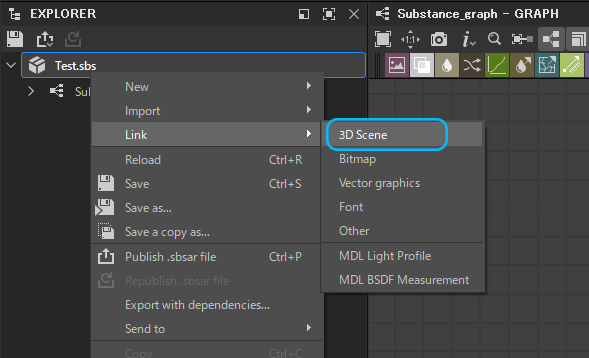
- Select your custom mesh and click “Open” to import into Substance Designer.
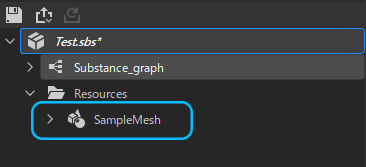
- Your model will be added to the “Resources” folder inside your SBS file.
- Drag and Drop the model into the “3D View.”
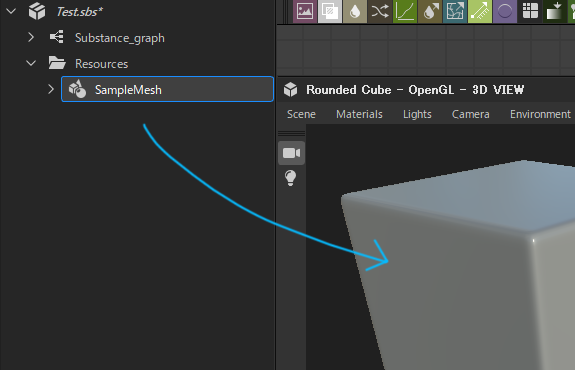
- It’s done! The viewport will update automatically and your custom model will appear.

About Substance Designer
Substance Designer is a texture creation tool used by game developers, film and animation studios, and other creative professionals.
It allows users to create textures and materials using a procedural nodal system. This means that instead of manually creating each asset, users can create a set of rules (or nodes) that will dynamically generate the textures.
This makes it possible to create complex textures very quickly and easily. Substance Designer is essential for anyone who creates digital art or visuals.

Nyx is an editor at Vertex Mode and a passionate 3D artist with years of experience in both gaming and film. With a deep love for digital art and visual storytelling, Nyx brings a unique blend of technical expertise and creative vision to every project. From sculpting detailed characters to designing immersive environments, their work reflects a commitment to pushing the boundaries of what’s possible in 3D design.
At Vertex Mode, Nyx not only oversees content but also shares valuable insights into the world of digital art and the creators behind it. They believe that every artist has a story worth telling, and through thoughtful articles and features, Nyx highlights the talent, challenges, and inspiration that shape the creative industry. Their perspective as a working 3D artist allows them to connect with readers in a way that feels both authentic and relatable.
Nyx’s expertise spans across concept development, modeling, and animation for both gaming and cinematic experiences. By blending artistry with technical precision, they continue to explore how digital tools can unlock new creative possibilities.
Through Vertex Mode, Nyx aims to inspire both aspiring and professional creators, offering resources, insights, and encouragement to thrive in the ever-evolving world of digital art.